MCP Is the Interface, Skills Are the Workflow
There is a pattern I now see in many “agent” discussions: people mix up tool access, workflow packaging, and task policy as if they were the same thing. They are not.
If you only remember one sentence from this post, it should be this:
MCP is the interface layer. Skills are the workflow layer.
That distinction matters because it changes how you build systems. If you use MCP where you should have used a Skill, you end up with a pile of disconnected tools and no consistent execution behavior. If you use a Skill where you should have used MCP, you get brittle prompt wrappers around APIs that should have been exposed as structured capabilities.
This post is an expanded engineering take on recent discussions around agent tooling. I will focus on the parts that actually matter in practice:
- what MCP concretely does on the wire;
- what a Skill should contain;
- how these two pieces interact inside an agent;
- when to build one, the other, or both.
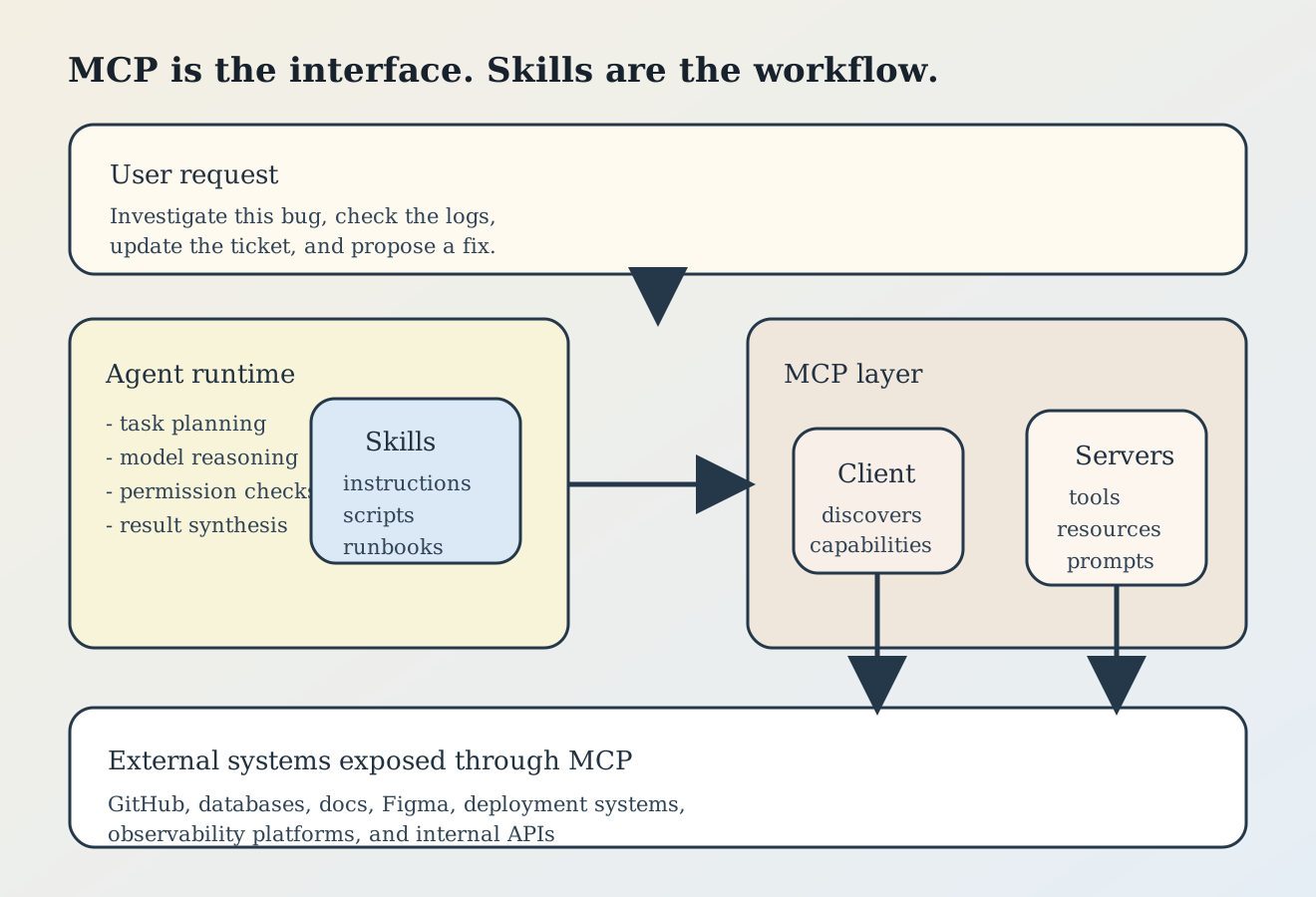
Figure 1. MCP and Skills solve different problems. MCP exposes capabilities. Skills package procedures and preferences for using those capabilities well.
1. What MCP actually is
MCP, the Model Context Protocol, is an open standard for connecting an AI application to external systems. The official documentation describes it as a standardized way to connect AI applications to data sources, tools, and workflows, and uses the now-common “USB-C for AI” analogy. That analogy is not bad, but it is still too abstract for engineering work.
The more precise definition is:
- an agent runtime acts as an MCP client;
- an MCP server exposes capabilities;
- the client and server speak a structured protocol;
- the protocol carries requests such as listing tools, reading resources, or invoking a tool with typed arguments.
In concrete terms, MCP gives the model a standard bridge to things outside the prompt window:
- filesystems,
- issue trackers,
- design systems,
- databases,
- documentation,
- internal APIs,
- deployment systems.
Without MCP, every agent platform tends to invent its own tool wrapper format. That creates fragmentation. With MCP, the same server can often be reused across multiple clients and agent runtimes.
2. MCP is not just “tools”
One common oversimplification is saying “MCP means tool calling.” That is incomplete. MCP has three primitives that matter in practice:
| Primitive | What it is for | Typical example |
|---|---|---|
tool | perform an action or computation | create a pull request, run a query, deploy a preview |
resource | expose readable context by URI | file:///repo/README.md, docs://api/authentication |
prompt | expose reusable prompt templates or workflows | ”review this diff”, “draft a release note”, “investigate an incident” |
That split is important.
If something is fundamentally read-only context, model it as a resource. If something causes a side effect, model it as a tool. If something is a reusable interaction pattern, model it as a prompt.
When teams flatten all three into “just tools,” they usually increase token cost, reduce discoverability, and make the system harder to reason about.
3. What MCP looks like at runtime
At runtime, the flow is usually much simpler than people imagine:
- the client connects to an MCP server;
- it initializes the session and discovers capabilities;
- it asks for
tools/list,resources/list, orprompts/list; - when needed, it sends a call with structured arguments;
- the server executes business logic and returns a structured result.
The transport depends on where the server lives:
| Transport | Best fit | Why |
|---|---|---|
stdio | local tools | simple, low-latency, easy to sandbox |
SSE or streamable HTTP | remote shared services | works across machines and teams |
| embedded/in-process adapters | tightly integrated platforms | lowest overhead, but less portable |
For local developer workflows, stdio is usually the cleanest choice. For shared infrastructure such as internal docs, ticketing, or deployment services, remote MCP often makes more sense.
Here is the level of structure you want a tool to have:
{
  "name": "create_preview_deployment",
  "description": "Build and deploy a preview environment for a branch",
  "inputSchema": {
    "type": "object",
    "properties": {
      "branch": { "type": "string" },
      "commit": { "type": "string" },
      "service": { "type": "string" }
    },
    "required": ["branch", "service"]
  }
}
The key point is not the JSON itself. The key point is that the contract is typed, explicit, and testable.
4. What Skills actually are
Skills solve a different problem.
OpenAI describes Skills as bundles of instructions, resources, and scripts that let Codex reliably connect to tools, run workflows, and complete tasks according to team preferences. The GitHub openai/skills repository also describes them as folders of instructions, scripts, and resources that agents can discover and use for specific tasks.
That is the right mental model:
- MCP gives an agent access to a capability
- a Skill teaches the agent how to use that capability well
For example:
- an MCP server may expose
list_figma_framesandexport_figma_asset; - a Skill may define the exact workflow for “implement design from Figma”:
- fetch reference frames;
- export required assets;
- compare visual spacing and typography;
- implement UI;
- run screenshot diff checks;
- produce a handoff note.
The server exposes the verbs. The Skill defines the procedure.
5. A good Skill is not a giant prompt
This is where many teams go wrong.
A weak Skill is just a long essay that says “when the user asks about deployments, be helpful and careful.” That does not package a reliable workflow.
A strong Skill has at least five properties:
-
clear trigger conditions
It should be obvious when the Skill applies. -
explicit success criteria
The agent should know what a correct output looks like. -
deterministic helpers
Repeated or error-prone work should move into scripts, templates, or checklists. -
failure handling
The Skill should say what to do when a dependency, tool, or permission is missing. -
bounded scope
The Skill should do one family of tasks well instead of trying to become a mini operating system.
In practice, a Skill often wants a structure like this:
skills/
  deploy-preview/
    SKILL.md
    scripts/
      create_preview.sh
      verify_preview.sh
    templates/
      rollout-note.md
    examples/
      sample-request.md
The SKILL.md should answer four concrete questions:
- when should the agent use this Skill?
- what steps should it follow?
- what scripts or files should it prefer?
- what output format should it produce?
6. MCP versus Skills: the clean separation
Here is the separation I recommend.
| Need | Build MCP? | Build Skill? | Why |
|---|---|---|---|
| expose a system capability to many agents | yes | maybe | this is a protocol/interface problem |
| standardize a multi-step workflow | maybe | yes | this is a procedure/policy problem |
| wrap an existing internal API for many teams | yes | maybe | reusability matters more than prompt logic |
| encode a team-specific runbook | no or later | yes | behavior consistency matters first |
| build a complete production workflow around tools | yes | yes | interface plus procedure |
The shortest rule is:
- if the problem is access, think MCP;
- if the problem is behavior, think Skill;
- if the problem is access plus behavior, build both.
7. The real shape of a production agent stack
Most useful agent systems end up looking like this:
- a model handles reasoning and language;
- a runtime manages planning, tool selection, permissions, and memory;
- Skills constrain and improve execution behavior;
- MCP servers expose the actual systems of record and action;
- logs, tests, and human review catch failures.
That means the right question is usually not “Should we use MCP or Skills?”
The right question is:
Which parts of this problem are protocol, which parts are workflow, and which parts must remain deterministic code?
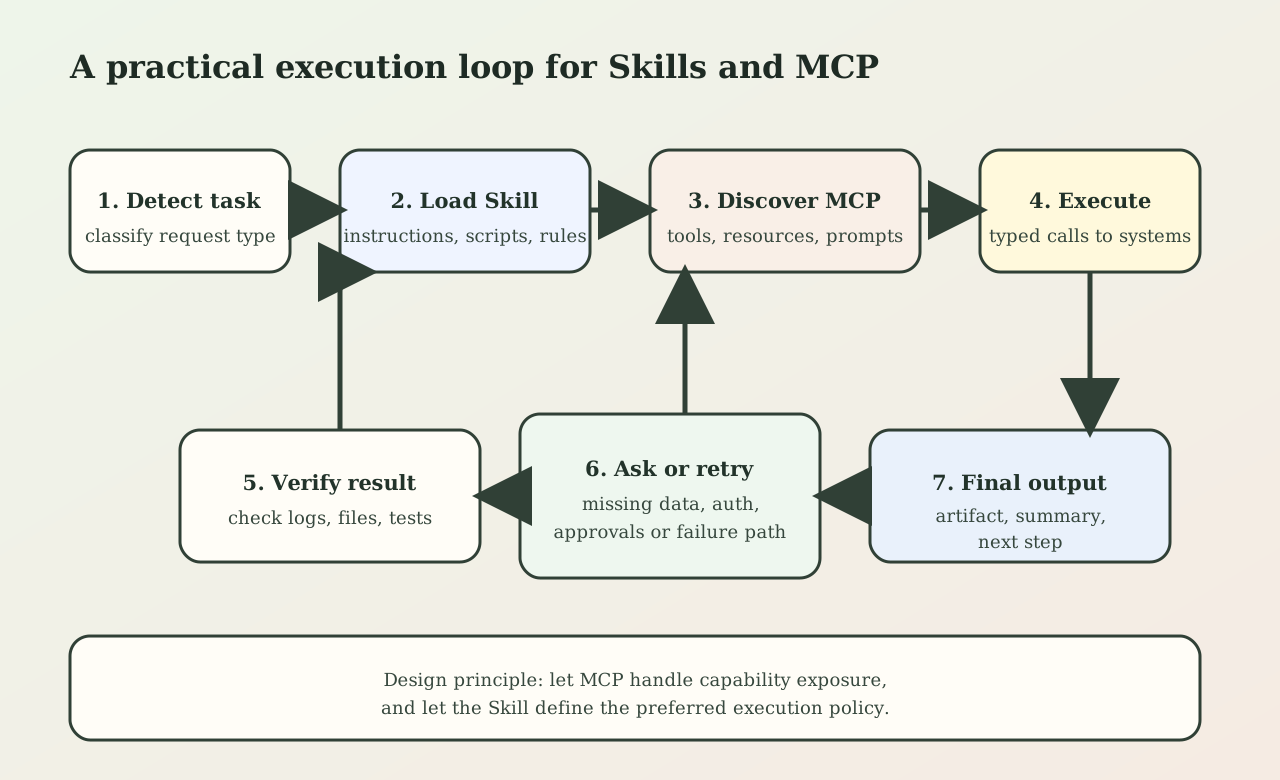
Figure 2. A reliable agent flow usually alternates between Skill guidance and MCP-backed execution. The Skill narrows the plan; MCP performs typed operations against real systems.
8. How I would build an MCP server in practice
The implementation details matter more than buzzwords.
If I were building an MCP server for an internal deployment system, I would do it in this order:
8.1 Start from the business operation, not from the protocol
First define the real operations:
- create preview deployment,
- check deployment status,
- fetch deployment logs,
- rollback deployment.
If those operations are not already clean in your backend or scripts, MCP will not save you. It will only expose the mess more efficiently.
8.2 Keep tool surfaces narrow
Do not expose ten subtly overlapping tools when three clear tools will do. A smaller tool surface:
- reduces model confusion,
- lowers argument errors,
- improves evaluation quality.
Bad:
deploydeploy_previewdeploy_branchtrigger_deploy_v2rollout_preview_candidate
Better:
create_preview_deploymentget_deployment_statusrollback_deployment
8.3 Make schemas strict
Use explicit enums, required fields, and validation.
For example, prefer:
{
  "environment": {
    "type": "string",
    "enum": ["preview", "staging", "production"]
  }
}
over a free-form string that later gets parsed by fragile backend logic.
8.4 Treat authorization as part of the design
An MCP server is a capability boundary. If it can trigger production actions, it must enforce real authorization and logging. The protocol itself does not replace security engineering.
Minimum bar:
- validate all inputs server-side;
- authenticate clients;
- scope credentials tightly;
- log every side-effecting action;
- rate-limit or queue expensive operations.
8.5 Return structured results, not walls of text
The agent should get back data it can reason over:
{
  "deployment_id": "dep_4821",
  "status": "building",
  "preview_url": "https://pr-182.example.dev",
  "logs_url": "https://deploy.example/logs/dep_4821"
}
The more deterministic the result, the less token budget the model wastes re-parsing prose.
9. How I would build a Skill in practice
A Skill should not duplicate the transport or the API. It should package the best operational policy for using those APIs.
For a deployment Skill, the SKILL.md should say something like:
- check whether the task is preview, staging, or production;
- if production, require explicit user confirmation;
- create the deployment using the MCP server;
- poll until the state is terminal or timeout is reached;
- fetch logs on failure;
- produce a concise rollout summary with links and next steps.
That is useful because it moves agent behavior from “figure something out” to “follow this runbook.”
My practical advice for Skill design is:
9.1 Prefer short instructions plus deterministic scripts
If a step can be encoded in shell, Python, or a checked-in template, do that. Do not make the model improvise CSV parsing, release note formatting, or screenshot comparison when a small helper script can do it better.
9.2 Put non-obvious judgment calls in the Skill
For example:
- when to stop and ask for approval,
- how to rank conflicting signals,
- what failure modes deserve escalation,
- which files or metrics matter most.
That is where the Skill adds real value.
9.3 Write Skills around recurring, expensive mistakes
The best Skills are usually built for tasks that are:
- high frequency,
- easy to get mostly right but costly to get wrong,
- structured enough to evaluate.
Good examples:
- release triage,
- incident report drafting,
- design implementation,
- API migration checklists,
- experiment analysis writeups.
9.4 Version Skills like code
If a Skill changes a rollout policy, documentation template, or testing sequence, that is a behavior change. Review it like code. Store it in the repo when the team should share it.
10. The biggest anti-patterns
There are a few failure modes I now expect by default.
10.1 Tool explosion
Teams expose every backend endpoint as a separate tool. The model then faces a wide, overlapping action surface and makes poorer choices.
10.2 Prompt-only automation
Teams skip proper interfaces and tell the model to “use curl against this API.” That works in demos and degrades in production.
10.3 Mega-Skills
One Skill tries to cover design, implementation, deployment, QA, and incident handling. Discovery gets worse and instruction conflicts grow.
10.4 Missing evaluation
If you cannot test whether the Skill or tool behavior improved outcomes, you are doing theater, not engineering.
11. A pragmatic rollout plan
If a team is starting from zero, I would not begin by building a huge agent platform. I would use this sequence:
- pick one repeated workflow with measurable value;
- clean the underlying script or API first;
- expose it through MCP if multiple agents or environments need it;
- package the runbook as a Skill;
- add logs, review checkpoints, and small evaluations;
- only then generalize.
That sequence is intentionally conservative. It forces the hard parts to become explicit:
- where the real system boundary is,
- where the repeatable workflow is,
- where the risky side effects are.
12. The main takeaway
MCP is useful because it standardizes how agents connect to systems.
Skills are useful because they standardize how agents should behave on recurring tasks.
Those are different engineering layers, and confusing them leads directly to bad system design.
If you want an agent that actually works in production:
- build MCP servers when you need reusable, typed capability exposure;
- build Skills when you need repeatable, team-aligned behavior;
- build both when the task is important enough that access and workflow both need to be first-class.
That is the difference between an agent that merely has tools and an agent that can reliably get work done.
References
- Model Context Protocol, “What is MCP?”: https://modelcontextprotocol.io/docs/getting-started/intro
- OpenAI, “Introducing the Codex app”: https://openai.com/index/introducing-the-codex-app/
- OpenAI Skills repository: https://github.com/openai/skills